在前面的教程中,我们比较系统地学习了处理单细胞测序数据的分析流程。分析流程严谨而精细,可以帮助我们获得很多有价值的信息。然而,对于长期专注于某一领域的研究者来说,每拿到一批数据都要走一遍这样的分析流程,其计算量大、耗费的时间精力多、效率低下,不太能满足研究者的效率需求。为了提高效率,研究者们开辟出了一条更为方便的捷径,即使用多个可靠的数据集构建一个整合的参考框架,在拿到新的数据之后不再需要从头开始分析,只需要通过算法将数据映射到参考数据集上,即可自动获得较高质量的注释。这个过程很像人工智能大模型的开发,即使用高质量的标注标注数据“训练”一个模型,学习其中的模式、特征和关联,让其获得充分的知识储备和逻辑分析能力,在遇到新问题时可以利用内部知识进行推理并生成答案。
数据集的预处理
我们先引入示例数据集,这份数据集包括由四种不同测序技术得到的人胰岛细胞数据,即CelSeq(GSE81076)、CelSeq2(GSE85241)、Fluidigm C1(GSE86469)和SMART-Seq2(E-MTAB-5061)。
1
2
3
4
5
6
| library(Seurat)
library(SeuratData)
library(ggplot2)
InstallData("panc8")
panc8 <- LoadData("panc8")
table(panc8$tech)
|
1
2
3
4
| > table(panc8$tech)
celseq celseq2 fluidigmc1 indrop smartseq2
1004 2285 638 8569 2394
|
需要注意:现在的四批数据之前存在批次效应,如果直接进行整合,所得到的结果中,细胞只会按照所使用的测序技术进行分类,而非按照细胞类型分类。这一点在前面的文章中有介绍,这里也将再次展示。
1
2
3
4
5
6
7
8
9
10
11
12
|
pancreas.ref <- subset(panc8, tech %in% c("celseq2", "smartseq2"))
pancreas.ref[["RNA"]] <- split(pancreas.ref[["RNA"]], f = pancreas.ref$tech)
pancreas.ref <- NormalizeData(pancreas.ref)
pancreas.ref <- FindVariableFeatures(pancreas.ref)
pancreas.ref <- ScaleData(pancreas.ref)
pancreas.ref <- RunPCA(pancreas.ref)
pancreas.ref <- FindNeighbors(pancreas.ref, dims = 1:30)
pancreas.ref <- FindClusters(pancreas.ref)
pancreas.ref <- RunUMAP(pancreas.ref, dims = 1:30)
DimPlot(pancreas.ref, group.by = c("celltype", "tech"))
|
1
2
3
4
5
6
7
8
9
10
11
12
13
| > pancreas.ref <- FindClusters(pancreas.ref)
Modularity Optimizer version 1.3.0 by Ludo Waltman and Nees Jan van Eck
Number of nodes: 4679
Number of edges: 174953
Running Louvain algorithm...
0% 10 20 30 40 50 60 70 80 90 100%
[----|----|----|----|----|----|----|----|----|----|
**************************************************|
Maximum modularity in 10 random starts: 0.9180
Number of communities: 19
Elapsed time: 0 seconds
|
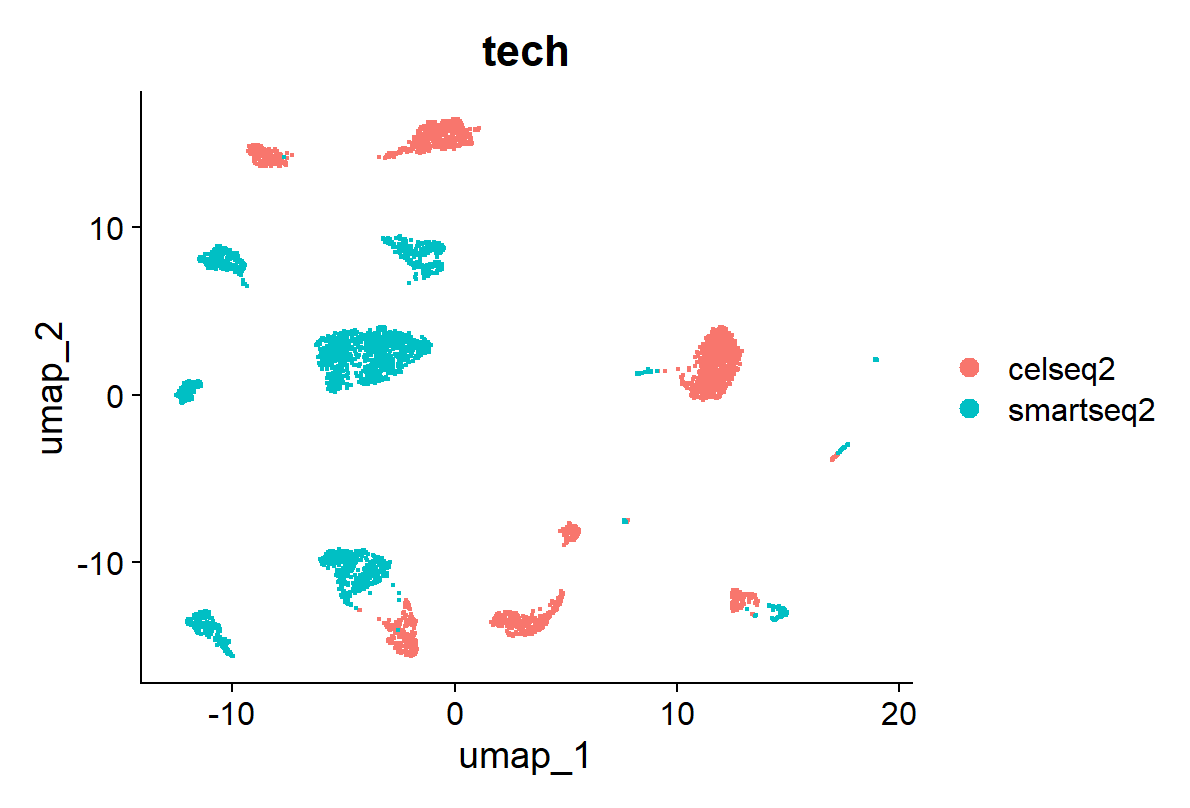
这很不靠谱……所以,整合吧
1
2
3
4
5
6
| pancreas.ref <- IntegrateLayers(object = pancreas.ref, method = CCAIntegration, orig.reduction = "pca",
new.reduction = "integrated.cca", verbose = FALSE)
pancreas.ref <- FindNeighbors(pancreas.ref, reduction = "integrated.cca", dims = 1:30)
pancreas.ref <- FindClusters(pancreas.ref)
pancreas.ref <- RunUMAP(pancreas.ref, reduction = "integrated.cca", dims = 1:30)
DimPlot(pancreas.ref, group.by = c("tech", "celltype"))
|
1
2
3
4
5
6
7
8
9
10
11
12
| Modularity Optimizer version 1.3.0 by Ludo Waltman and Nees Jan van Eck
Number of nodes: 4679
Number of edges: 190152
Running Louvain algorithm...
0% 10 20 30 40 50 60 70 80 90 100%
[----|----|----|----|----|----|----|----|----|----|
**************************************************|
Maximum modularity in 10 random starts: 0.8680
Number of communities: 15
Elapsed time: 0 seconds
|
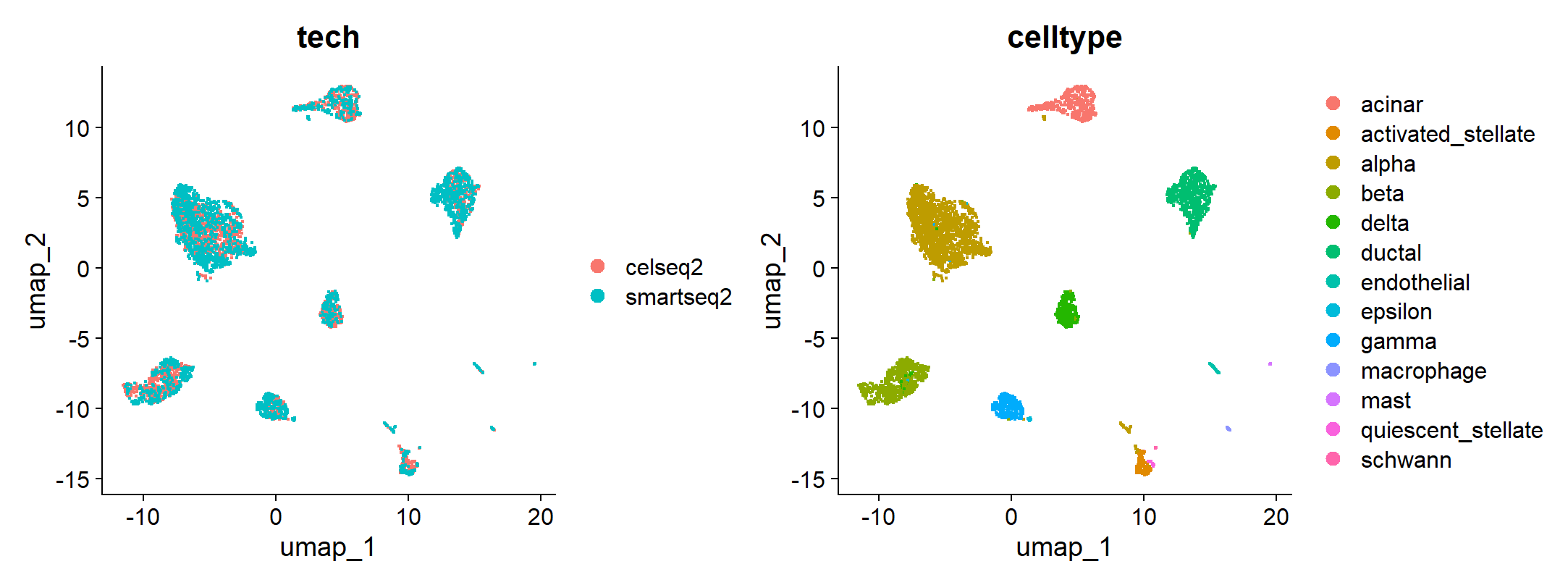
到这里,我们的参考数据集就做好啦!
使用参考数据集对细胞进行分类
Seurat可以将参考数据集的结构和信息映射到我们所分析的数据集上。这就好比将新的卫星拍摄的俯瞰图重叠在一张已有的、做好标注的图片上,从而快速识别新图片中的信息和变化。
Seurat的映射功能具有以下两个值得注意的特征:
- 不改变原数据集的信息。 在数据的映射过程中,Seurat只会对所处理的数据集的细胞信息进行标记和注释,不会对其进行纠正或篡改。
- 默认使用PCA降维结果进行映射,而不使用CCA。 我们现在的目的是注释和标记,而不是将参考数据集和待分析的数据集进行比较,因此不需要使用CCA降维消除批次效应。CCA算法消除批次效应的本质是让两个数据集相互“妥协”和“对齐”,这势必会对两个数据集的原始信息发生改变,削弱了参考数据集的权威性,也破坏了待分析数据集的真实性——这绝对是我们不愿见到的。
我们将映射后,待分析数据集和参考数据集之间生物学状态相对应的“细胞对”称为 锚点(archor) 。通过FindTransferAnchors()函数,我们得以找到不同数据集之间的锚点。在这之后,我们可以利用TransferData()函数进行数据标记的转移,也就是以参考数据集为参考,对待分析的数据集的细胞进行标记。TransferData()函数的运行结果是一个包括了各个细胞的预测细胞类型和预测的相似度的矩阵(表格),我们可以使用AddMetaData()函数将其加入到待分析数据集中,从而实现细胞的标注。
1
2
3
4
5
6
| pancreas.query <- subset(panc8, tech %in% c("fluidigmc1", "celseq"))
pancreas.query <- NormalizeData(pancreas.query)
pancreas.anchors <- FindTransferAnchors(reference = pancreas.ref, query = pancreas.query, dims = 1:30,
reference.reduction = "pca")
predictions <- TransferData(anchorset = pancreas.anchors, refdata = pancreas.ref$celltype, dims = 1:30)
pancreas.query <- AddMetaData(pancreas.query, metadata = predictions)
|
到这里,我们的映射和注释工作就完成了。但是还有一个问题:映射的准确度怎么样?所得到的结果能不能让人信服?刚好,我们的数据包里存储了各个细胞的准确细胞类型,我们可以来对比对比:
1
2
| pancreas.query$prediction.match <- pancreas.query$predicted.id == pancreas.query$celltype
table(pancreas.query$prediction.match)
|
1
2
3
4
| > table(pancreas.query$prediction.match)
FALSE TRUE
63 1579
|
不难看出,虽然有少数细胞标注错误,但大多数细胞都得以正确标注。我们还可以检查特定的细胞类型,观察待分析数据集中的细胞是否被正确标注;尤其是数量较小的细胞,因为参照少,这类细胞特别容易被标错。
1
| table(pancreas.query$predicted.id)
|
1
2
3
4
5
6
7
8
9
10
| > table(pancreas.query$predicted.id)
acinar activated_stellate alpha
262 39 436
beta delta ductal
419 73 330
endothelial gamma macrophage
19 41 15
mast schwann
2 6
|
1
| VlnPlot(pancreas.query, c("REG1A", "PPY", "SST", "GHRL", "VWF", "SOX10"), group.by = "predicted.id")
|
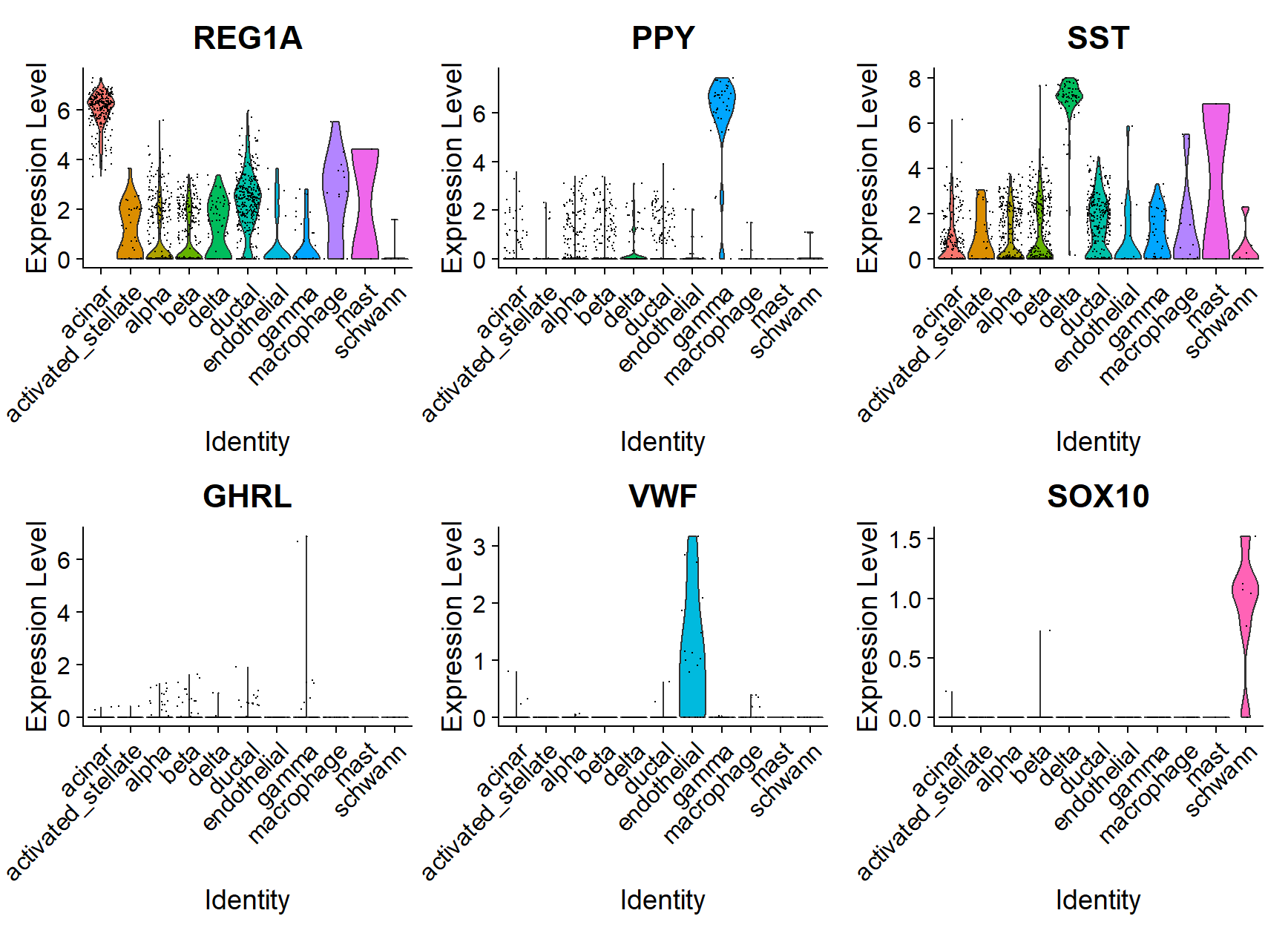
利用小提琴图展示不同细胞簇的基因表达模式是最能让人信服的验证手段。我们可以看见,不同细胞簇的细胞类型和细胞的表达模式彼此对应,如下表所示。
| 细胞类型 |
特征基因 |
| 腺泡细胞(acinar) |
REG1A |
| PP细胞(gamma) |
PPY |
| δ细胞(delta) |
SST |
| ε细胞(epsilon) |
GHRL |
| 内皮细胞(endothelial) |
VWF |
| 施万细胞(schwann) |
SOX10 |
UMAP映射
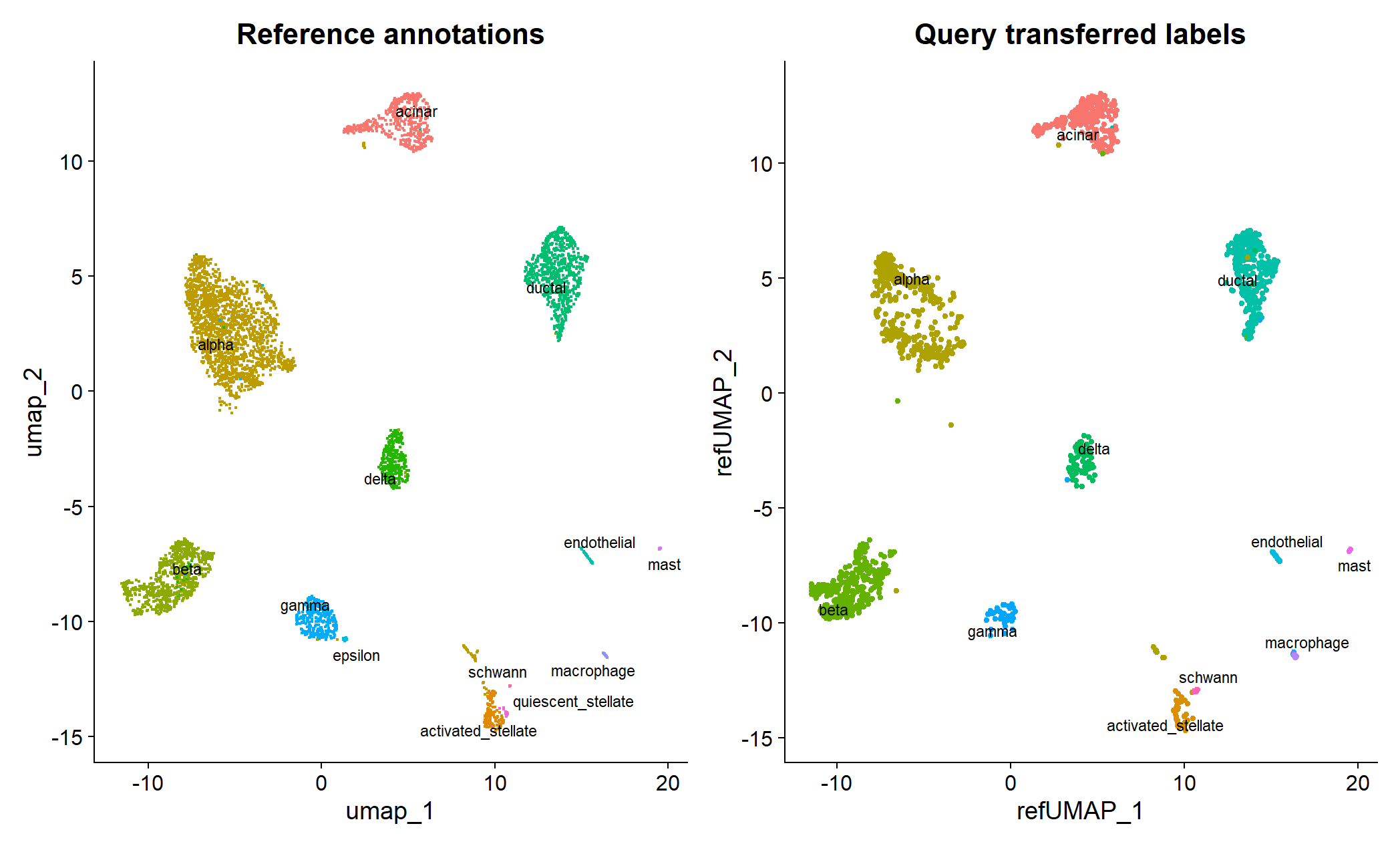
当我们有一个准确的UMAP参考数据框架时,我们可以直接将待分析数据集映射在参考UMAP框架上,从而实现快速标记和注释。这一过程主要是通过MapQuery()函数实现的。在这之后,我们可以将参考数据集和待分析数据集一起可视化。
1
2
3
4
5
6
7
8
| pancreas.ref <- RunUMAP(pancreas.ref, dims = 1:30, reduction = "integrated.cca", return.model = TRUE)
pancreas.query <- MapQuery(anchorset = pancreas.anchors, reference = pancreas.ref, query = pancreas.query,
refdata = list(celltype = "celltype"), reference.reduction = "pca", reduction.model = "umap")
p1 <- DimPlot(pancreas.ref, reduction = "umap", group.by = "celltype", label = TRUE, label.size = 3,
repel = TRUE) + NoLegend() + ggtitle("Reference annotations")
p2 <- DimPlot(pancreas.query, reduction = "ref.umap", group.by = "predicted.celltype", label = TRUE,
label.size = 3, repel = TRUE) + NoLegend() + ggtitle("Query transferred labels")
p1 + p2
|
参数 reference.reduction = “pca”指定了参考数据集用于计算锚点的降维空间(这里是原始PCA)。这与前面 FindTransferAnchors时使用的 reference.reduction = “pca”是一致的。
完整代码
1
2
3
4
5
6
7
8
9
10
11
12
13
14
15
16
17
18
19
20
21
22
23
24
25
26
27
28
29
30
31
32
33
34
35
36
37
38
39
40
41
42
43
44
45
46
47
48
49
50
| library(Seurat)
library(SeuratData)
library(ggplot2)
InstallData("panc8")
panc8 <- LoadData("panc8")
table(panc8$tech)
# 注意:这是不消除批次效应、直接整合的错误示范,实际分析的时候应避免!!
# 我们使用其中的两种测序方法得到的数据集构建参考框架。
pancreas.ref <- subset(panc8, tech %in% c("celseq2", "smartseq2"))
pancreas.ref[["RNA"]] <- split(pancreas.ref[["RNA"]], f = pancreas.ref$tech)
pancreas.ref <- NormalizeData(pancreas.ref)
pancreas.ref <- FindVariableFeatures(pancreas.ref)
pancreas.ref <- ScaleData(pancreas.ref)
pancreas.ref <- RunPCA(pancreas.ref)
pancreas.ref <- FindNeighbors(pancreas.ref, dims = 1:30)
pancreas.ref <- FindClusters(pancreas.ref)
pancreas.ref <- RunUMAP(pancreas.ref, dims = 1:30)
DimPlot(pancreas.ref, group.by = c("celltytpe", "tech"))
pancreas.ref <- IntegrateLayers(object = pancreas.ref, method = CCAIntegration, orig.reduction = "pca",
    new.reduction = "integrated.cca", verbose = FALSE)
pancreas.ref <- FindNeighbors(pancreas.ref, reduction = "integrated.cca", dims = 1:30)
pancreas.ref <- FindClusters(pancreas.ref)
pancreas.ref <- RunUMAP(pancreas.ref, reduction = "integrated.cca", dims = 1:30)
DimPlot(pancreas.ref, group.by = c("tech", "celltype"))
pancreas.query <- subset(panc8, tech %in% c("fluidigmc1", "celseq"))
pancreas.query <- NormalizeData(pancreas.query)
pancreas.anchors <- FindTransferAnchors(reference = pancreas.ref, query = pancreas.query, dims = 1:30,
                                        reference.reduction = "pca")
predictions <- TransferData(anchorset = pancreas.anchors, refdata = pancreas.ref$celltype, dims = 1:30)
pancreas.query <- AddMetaData(pancreas.query, metadata = predictions)
pancreas.query$prediction.match <- pancreas.query$predicted.id == pancreas.query$celltype
table(pancreas.query$prediction.match)
table(pancreas.query$predicted.id)
VlnPlot(pancreas.query, c("REG1A", "PPY", "SST", "GHRL", "VWF", "SOX10"), group.by = "predicted.id")
pancreas.ref <- RunUMAP(pancreas.ref, dims = 1:30, reduction = "integrated.cca", return.model = TRUE)
pancreas.query <- MapQuery(anchorset = pancreas.anchors, reference = pancreas.ref, query = pancreas.query,
    refdata = list(celltype = "celltype"), reference.reduction = "pca", reduction.model = "umap")
p1 <- DimPlot(pancreas.ref, reduction = "umap", group.by = "celltype", label = TRUE, label.size = 3,
    repel = TRUE) + NoLegend() + ggtitle("Reference annotations")
p2 <- DimPlot(pancreas.query, reduction = "ref.umap", group.by = "predicted.celltype", label = TRUE,
    label.size = 3, repel = TRUE) + NoLegend() + ggtitle("Query transferred labels")
p1 + p2
|